A command palette for Chrome.
⌘⇧K, type,
⏎, gone.
Press ⌘⇧K, type a few characters, hit Enter. Summon searches the bookmarks you keep curated, jumps to any open tab across windows, and reaches your full Chrome bookmark tree (Pro). No account, no cloud sync. Free; Pro is one-time.
Not Raycast for Chrome or Alfred for Chrome. Summon lives in the browser, where work already is.
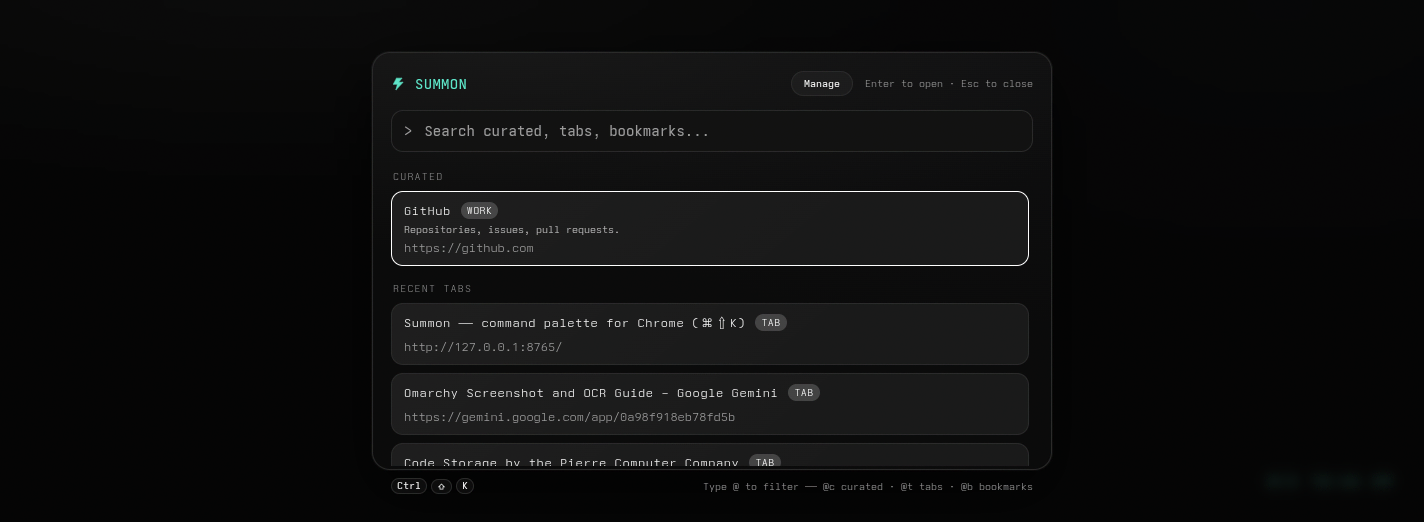
open
Three keystrokes, start to finish. Summon brings keyboard shortcuts to the bookmarks and tabs you already use. Press ⌘⇧K and the palette drops over the page, input already focused. Type a few characters and the curated shortlist ranks what you keep. Press ⏎ The row opens, the palette is gone.
type
Set aliases (Pro) or use the defaults: fig + ⏎ opens Figma, @t docs filters open tabs, @b hn walks your bookmark tree (Pro). A few characters, no mouse, no tab-strip archaeology.
scope
@ narrows the search in one keystroke. It leaves the field and becomes a chip, clearable with backspace.
- @c
- curated: your shortlist of most-used links.
- @t
- tabs: open tabs across windows, focusable.
- @bpro
- bookmarks: the full Chrome bookmark tree, ranked.
switch
The tab switcher sorts by recency, so switch-to-recent is one keystroke. With a query: tabs match on title or URL, and ⏎ focuses the existing tab and its window, no new tab opened. The list is fetched live each time.
customize
Summon replaces Chrome's new tab page too: your background image, your color, optional drop shadow, fullscreen mode, toggleable date and time. The palette still works there: two surfaces, one product.
privacy
No account, no login, no cloud sync. Everything stays in your browser's local extension storage. Summon runs no server. The only external call is to Polar.sh's public license-key API, and only when you enter a Pro key yourself.
No telemetry, no analytics, no tracking. Permissions are minimal and scoped: bookmarks, storage, scripting, tabs, alarms, plus host access so the palette can open over any page. Any future change is disclosed in the store listing.
pro
Pro is a one-time purchase. Pay once, own it on that device. The table below is the whole story.
| Feature | Free | Pro |
|---|---|---|
| Curated bookmarks | up to 10 | up to 500 |
| Themes | Mono only | Mono, Neon Noir, Light |
| Rename curated items | no | Yes |
| Custom aliases | Yes (keyword pinning) | Yes |
| Full bookmark-tree search | no | Yes (@b + Bookmarks section) |
| One-time price | no | pay once, own it |
Buy once, unlock forever on a device. 7-day offline grace. No backend we run. License validated directly against Polar's public API. Source under MIT.
faq
- Does this send my data anywhere?
- No. Everything stays in your browser's local extension storage. The only external call is to Polar.sh's public license-key API, and only when you enter a Pro key yourself.
- Is this a subscription?
- No. Pro is a one-time purchase. Pay once, own it on that device.
- What happens to my curated list if I go over 10 on free?
- The 10 most-recently-used stay curated; the rest stay in your full bookmark tree, still searchable via @b (Pro).
- What license provider do you use?
- Polar.sh: license-key based, validated directly against their public API from your device. 7-day offline grace, then a reconnect revalidates.
- Does Summon change my browser's new tab page?
- Yes. Installing replaces Chrome's default new tab page with Summon's. You choose the background (image or color), optional drop shadow, fullscreen image mode, and a toggleable date and time. The palette still works from the new tab page. Uninstall or disable the extension and Chrome's default new tab page returns.
- Can I change the keyboard shortcut that opens Summon?
-
Yes. Chrome manages extension shortcuts, not Summon. In
Chrome, open
chrome://extensions/shortcuts
(or navigate to
chrome://extensions→ Keyboard shortcuts from the top menu), find Summon, and rebind the palette shortcut. The default is ⌘⇧K on macOS and Ctrl+Shift+K on Windows/Linux.